Get Interviews With 3–6 ATS Resume Keywords That Work

Help shape a future CV tailoring tool. Start the JobTide early-access questionnaire →
ATS resume keywords are the exact terms and phrases a job posting uses to describe skills, tools, titles, and duties. Mirror them honestly in your summary, skills block, and first bullets. The fastest fix you can make right now: pull the job description, highlight repeated terms, and place the top three to six in your resume’s opening lines. Then run a copy-paste check to confirm an ATS can actually read them.
TL;DR:
- Focusing on hard skills, tools, and certifications yields the highest ATS and recruiter relevance, especially when placed at the top and repeated in context.
- Using industry-standard job titles and exact keyword phrasing from multiple job postings increases the chance of passing ATS filters.
- Position keywords in key resume areas such as the summary, skills block, and the first bullets under each role for maximum visibility.
- Tailoring the resume involves identifying 3 to 6 core keywords appearing across similar postings, backed by concrete examples.
- Avoid templates with multi-column layouts, graphics, or inconsistent formatting, and always save in .docx or text-based PDFs for optimal ATS parsing.
Table of Contents
- How Applicant Tracking Systems Read and Score Keywords
- The Four Types of ATS Keywords Worth Your Time
- How Do You Extract the Right Keywords From a Job Posting?
- Where Should Keywords Go on Your Resume?
- Sample ATS Keyword Lists by Industry and Job Title
- How Many Keywords Do You Actually Need, and How Do You Check?
- Common Mistakes That Break ATS Parsing
- Your Copy-Paste Resume Skeleton and Final Checklist
- What I’ve Learned Testing This Process Against Real Postings
- Job Tide Helps You Spend Less Time Tailoring, Not More
- Sources
How Applicant Tracking Systems Read and Score Keywords
Most applicant tracking systems don’t “read” your resume the way a hiring manager does. They parse it into plain text, then sort that text into structured fields: job titles, dates, skills, education. If your formatting confuses that process, whole sections can end up misfiled or dropped entirely, even when the content is strong.
This is why exact phrasing matters more than clever synonyms. A system scanning for “project management” won’t reliably credit you for writing “leading cross-functional initiatives,” even though a human recruiter would understand the overlap instantly. UK government guidance on application filters confirms these filters are standard practice now, and tailoring your CV to match the posting’s own language is the most reliable way through them.
Context matters too. A keyword sitting alone in a skills list carries less weight than the same term backed by evidence in a bullet point. “Budget forecasting” next to a number, a team size, or a dollar figure reads as proof, not decoration.
Three things drive how well your resume gets scored:
- Exact match language — the system credits “SQL” for “SQL,” not “database querying.”
- Field placement — titles, dates, and skills need to sit in fields the parser expects, not buried in a text box or table.
- Repetition with context — a keyword mentioned once in a skills list scores lower than one repeated inside a results-driven bullet.
Quick fact: Roleframe’s analysis of ATS behavior found that keywords placed near the top of a resume and repeated in context across experience bullets improve matches with both the parser and the human doing a fast skim afterward. Placement isn’t cosmetic. It’s functional.
The Four Types of ATS Keywords Worth Your Time
Not every keyword deserves equal effort. Some categories carry far more weight with parsers and recruiters than others, so spend your tailoring time where it actually moves the needle.
Job titles and their honest variants. If the posting says “Senior Data Analyst” and your last role was “Data Analyst II,” it’s fair to note the equivalent framing in your summary, as long as it reflects your real scope of work. Never invent a title you didn’t hold, but do use the industry-standard version of your role if your employer used an unusual internal label.
Hard skills, tools, and certifications. This is the highest-value category for ATS matching. Software names, programming languages, methodologies (Agile, Six Sigma), and credentials (PMP, CPA, AWS Certified) are concrete, searchable, and easy for a parser to confirm. These terms should appear both in your skills block and inside a bullet that proves you used them.
Experience phrasing tied to responsibilities. Job postings often repeat specific action phrases: “managed vendor relationships,” “conducted root-cause analysis,” “led onboarding for new hires.” These phrases function as searchable strings even though they read like normal sentences. Borrow the posting’s own verbs and nouns where your actual experience supports it.
Soft skills, used sparingly and in context. Terms like “communication,” “leadership,” or “collaboration” carry the lowest ATS priority. Parsers struggle to verify them, and reviewers tend to discount a bare list of adjectives. If a posting emphasizes a soft skill heavily, work it into a sentence with evidence, such as “presented quarterly results to executive leadership,” rather than listing “communication” on its own.
The ranking, from highest to lowest ATS value, looks like this:
- Hard skills, tools, and certifications
- Job titles and honest variants
- Experience phrasing and responsibility language
- Soft skills, embedded in context
Spend most of your tailoring energy on the top two categories. They’re what both the software and the recruiter are actually scanning for first.
How Do You Extract the Right Keywords From a Job Posting?
Guessing at keywords wastes time. A short, repeatable process gets you a tailored keyword list in under ten minutes, and it works whether you’re applying to one job or fifty.
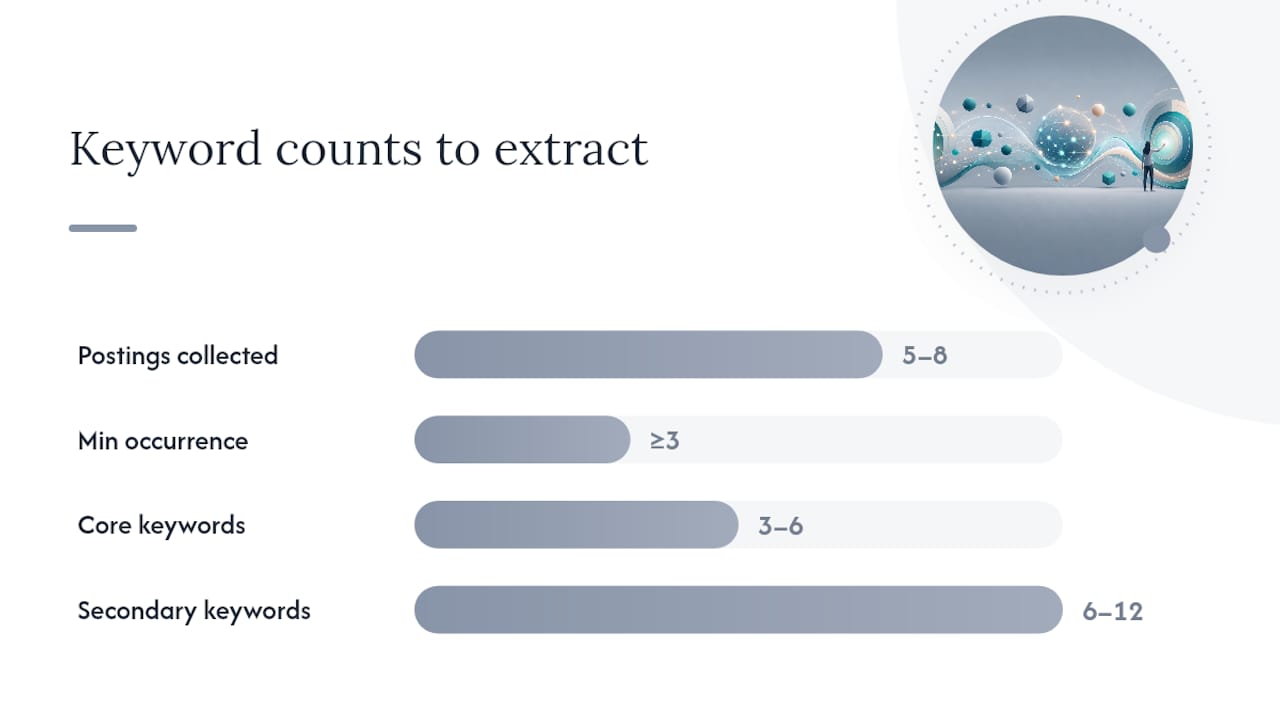
- Collect five to eight live postings for the same role. Pull them from different companies, not just one. This reveals which terms are truly standard for the role versus one employer’s quirky phrasing.
- Highlight every repeated term. Go line by line through each posting and mark skills, tools, certifications, and responsibility phrases that show up more than once across your set.
- Apply the frequency rule. Coursera’s guidance on resume keywords recommends treating any term appearing in at least three of five postings as a core keyword worth prioritizing.
- Sort required versus preferred. Most postings separate “requirements” from “nice to have.” Required terms are non-negotiable for your resume; preferred terms are useful extras if you genuinely have them.
- Build a two-column list. One column for hard skills and tools, one for experience phrases and responsibilities. This keeps you from accidentally overloading one category and neglecting the other.
- Select three to six core keywords. These are the terms that appeared most often and matter most for the role. They belong in your summary and skills block, not buried on page two.
- Select six to twelve secondary keywords. These support the core list and get worked into your experience bullets where they genuinely apply.
- Mirror exact phrasing, including acronyms. If the posting says “Search Engine Optimization (SEO),” use both the full term and the acronym somewhere in your resume. Parsers sometimes search for one or the other, not both.
Pro Tip: Keep a running document of every job description you apply to alongside the keyword list you built for it. After five or six applications, you’ll start noticing which terms show up across nearly every posting in your field, and that becomes your permanent core list for that job title.
This process only works if you place keywords honestly. Never mirror a term for a skill or tool you can’t actually speak to in an interview. A resume that gets you shortlisted for a skill you don’t have wastes everyone’s time, including yours.
Where Should Keywords Go on Your Resume?
Placement determines whether a keyword actually gets counted or just sits there unread. Four zones matter most, and they roughly follow the order an ATS parser and a human reviewer both scan.
The headline or summary, the first three to five lines. This is prime real estate. Roleframe’s placement research recommends putting your three to six most important keywords here, since both the parsing engine and a recruiter’s first skim weight this section heavily.
The skills block. This is where hard skills, tools, and certifications live in list form. Keep it clean and specific: “Salesforce, HubSpot, SQL, Google Analytics” reads better to a parser than a vague paragraph describing your technical comfort level.
Job titles, both current and past. Use the industry-standard version of your title if your actual title was non-standard internally, as long as it’s an honest reflection of the role.
The first bullet under each role. Recruiters and parsers both give more attention to the opening lines of each job entry. Front-load your strongest, most keyword-relevant achievement there instead of saving it for bullet four or five.
Here’s what context-bearing keyword placement actually looks like in practice:
Skills line example: “Skills: Google Ads, Meta Business Suite, SEMrush, HubSpot CRM, A/B Testing, Budget Forecasting”
Quantified bullet example: “Managed a $45,000 monthly ad budget across Google Ads and Meta, running A/B tests that improved click-through rate by cutting cost-per-lead.”
Notice the second example doesn’t just list tools. It ties them to a number and an outcome, which is exactly the kind of contextual evidence that strengthens both ATS relevance and recruiter trust.
A resume that lists “budget forecasting” in a skills column and a resume that shows “forecasted and managed a $45,000 monthly budget” are read very differently by both software and people. One is a claim. The other is proof.
Formatting affects whether any of this gets seen at all. ATSGrader’s template guidance lays out the core rules for an ATS-friendly structure:
- Use a single-column layout, not multi-column or side-panel designs.
- Stick to standard section headings: “Experience,” “Skills,” “Education,” not creative labels like “My Journey” or “What I Bring.”
- Put contact information in the main body text, never inside a header or footer, since many parsers skip those fields entirely.
- Save your resume as a standard .docx or text-based PDF, never an image-based PDF or a design file exported as a flattened image.
- Avoid tables, text boxes, and graphics for anything containing keywords, since parsers often can’t extract text trapped inside them.
Run a simple test before you submit anything: copy your entire resume and paste it into a plain-text editor like Notepad or a blank Google Doc. If the sections scramble, merge together, or lose their order, an ATS will likely see the same mess.
Sample ATS Keyword Lists by Industry and Job Title
These sets are starting points, not exhaustive lists. Adapt them using the extraction method above once you’ve pulled real postings for your specific title.
Technology
Primary keywords: Python, JavaScript, Git, API integration, cloud infrastructure, Agile, CI/CD, AWS, Docker, unit testing, cross-functional collaboration, debugging.
Experience phrases: “developed and deployed scalable applications,” “collaborated with product teams to define technical requirements,” “reduced deployment time through automated testing.”
Data and Analytics
Primary keywords: SQL, Python, Tableau, Power BI, data visualization, statistical analysis, A/B testing, data pipeline, machine learning, Excel, R, predictive modeling.
Experience phrases: “built dashboards to track key performance metrics,” “conducted statistical analysis to inform business decisions.”
Marketing
Primary keywords: SEO, Google Analytics, content strategy, email marketing, HubSpot, Meta Business Suite, campaign management, brand positioning, conversion rate optimization, marketing automation.
Experience phrases: “increased organic traffic through targeted SEO strategy,” “managed multichannel campaigns across paid and organic channels.”
Finance
Primary keywords: financial modeling, forecasting, budget management, GAAP, variance analysis, Excel, QuickBooks, reconciliation, risk assessment, financial reporting.
Experience phrases: “prepared monthly financial statements for executive review,” “managed budget forecasting for a $2 million departmental spend.”
Sales and Customer Service
Primary keywords: CRM, Salesforce, pipeline management, lead generation, client retention, quota attainment, account management, customer satisfaction, cold outreach.
Project Management
Primary keywords: Agile, Scrum, PMP, stakeholder management, Gantt charts, risk mitigation, cross-functional teams, Jira, resource allocation, project lifecycle.
Experience phrases: “led cross-functional teams through project delivery,” “managed project timelines across multiple concurrent initiatives.”
Healthcare
Primary keywords: EHR (Electronic Health Records), HIPAA compliance, patient care coordination, clinical documentation, care planning, medical terminology, patient intake, regulatory compliance.
Experience phrases: “coordinated care plans across multidisciplinary teams,” “maintained accurate clinical documentation in compliance with HIPAA standards.”
To adapt any of these lists to a niche title, run three or four real postings for that exact title through the extraction process from the earlier section. A “Growth Marketing Manager” posting will overlap heavily with the general marketing list above, but it will also surface niche terms like “cohort analysis” or “retention modeling” that a generic list would miss entirely.
How Many Keywords Do You Actually Need, and How Do You Check?
You don’t need every keyword from the posting. You need the right handful in the right places, confirmed before you hit submit.
Aim for three to six core keywords in your summary and headline, appearing two to three times total across the resume once you count the skills block and a supporting bullet. Secondary keywords generally only need one appearance, ideally inside a bullet where they’re backed by a real result rather than floating in a list.
Free scanners and keyword checkers can estimate how well your resume matches a specific job description before you apply. Roleframe notes that these tools are useful for a quick gut check, but they come with real limits: match percentages vary by tool, and uploading your resume to an unfamiliar site raises fair privacy questions, so stick to reputable, well-known checkers rather than obscure ones asking for excessive personal detail.
Run this checklist before you submit anything:
- Copy-paste your resume into a plain-text editor and confirm nothing scrambles.
- Confirm your file is saved as .docx or a text-based PDF, not an image scan.
- Check that your contact information sits in the main body, not a header or footer.
- Verify your top three to six keywords appear in your summary and skills block.
- Scan each bullet for at least one concrete, verifiable keyword tied to a result.
Common Mistakes That Break ATS Parsing
Most resume rejections at the automated stage come down to a handful of repeat offenders, and nearly all of them are fixable in an afternoon.
Design choices that confuse parsers. Multi-column layouts, embedded tables, icons, and headshot photos might look sharp to a human, but many systems either misread the column order or skip the content entirely. CV-Review’s testing found that a large share of popular aesthetic templates fail basic parsing for exactly this reason.
Keyword stuffing without proof. Repeating “leadership” five times across a resume with no supporting example doesn’t fool anyone, human or machine. It just crowds out real content.
Keywords isolated in a skills list with zero backup. A skills block full of impressive terms means little if not one of them shows up again inside an actual accomplishment bullet.
Wrong file formats and inconsistent details. Image-based PDFs are often unreadable to parsers. Inconsistent job titles or date formats between your resume and your LinkedIn profile can also trigger red flags during manual review, even after you clear the automated stage.
- Avoid multi-column and graphics-heavy templates.
- Never repeat a keyword without backing it with a real example.
- Pair every skills-list term with at least one supporting bullet somewhere.
- Save as .docx or text-based PDF, and double-check dates and titles for consistency.
Your Copy-Paste Resume Skeleton and Final Checklist
Use this skeleton as a starting structure, then fill it with your own keyword-matched content from the sections above.
Eight fast checks before you submit:
- Job title reflects the posting’s language, honestly.
- Summary contains three to six core keywords in the first three lines.
- Skills block lists hard skills and tools, not vague adjectives.
- At least one bullet per role backs a keyword with a number or result.
- File saved as .docx or text-based PDF.
- Contact information sits in the body, not a header or footer.
- Copy-paste test into plain text shows no scrambled sections.
- Dates and titles match across your resume and LinkedIn profile.
Plain-text resume skeleton:
- Full Name | Phone | Email | City, State | LinkedIn URL
- Summary: [Job Title] with [X years] of experience in [core keyword], [core keyword], and [core keyword]. Proven track record of [quantified achievement].
- Skills: [Hard skill], [Tool], [Certification], [Hard skill], [Tool], [Methodology]
- Experience: [Job Title], [Company], [Dates] — [Bullet with keyword and quantified result], [Bullet with keyword and result]
- Education: [Degree], [School], [Year]
If you’re entry-level, move a short “Relevant Coursework” or “Projects” section above Experience, and lean harder on certifications and tools since you have less job history to draw keywords from. If you’re mid-senior, trim older roles to one or two bullets each and push your most recent, most keyword-dense role to the top of the page where both the parser and the recruiter look first.
What I’ve Learned Testing This Process Against Real Postings
Most advice on this topic treats keyword matching like a one-time task: tailor once, submit, move on. That’s backwards. The postings that seem nearly identical on the surface, two “Marketing Manager” roles at similarly sized companies, often want genuinely different core skills once you actually run them through a frequency comparison. Assuming one tailored resume covers a whole job title is the single most common mistake I see, and it’s rarely a lack of effort. It’s a lack of a repeatable process.
The bigger issue underneath all of this is one of matching, not motivation. Research on hidden workers from Harvard Business School points to how much good talent gets filtered out simply because search and selection systems weren’t built to surface them well. Keyword optimization is a real skill worth learning, but it’s also a workaround for a matching problem that shouldn’t fall entirely on the applicant.
That’s part of why narrowing the postings you apply to matters as much as tailoring each one. Fewer, better-matched applications beat a high volume of loosely tailored ones almost every time, since each one gets the attention a frequency-based keyword pass actually requires.
— Alisher
Job Tide Helps You Spend Less Time Tailoring, Not More
Every step above works. It also takes real time, especially if you’re applying to a dozen roles a week. Job Tide narrows that workload from the other direction: instead of tailoring a resume for every posting you find, you get personalized job recommendations filtered against your actual skills and preferences, so the postings landing in front of you already fit closer to what you offer.
That doesn’t replace the keyword work in this guide. It reduces how many resumes you need to run through it. Fewer, better-matched postings mean fewer full keyword extractions, fewer rewritten summaries, and more time spent on the applications that actually have a shot. Job Tide is currently opening access as it launches, with filtering tools built specifically to cut down the noise that makes job searching exhausting in the first place. Head to Job Tide and set your filters to see roles matched to your actual background before you spend another evening tailoring a resume for a posting that was never a great fit to begin with.
Sources
Help shape JobTide.
Tell us about your job search in our early-access questionnaire. JobTide is in development; completing it does not generate a resume.
Start my questionnaire →