Boolean Search Jobs: How to Find Roles Faster

Help shape a future CV tailoring tool. Start the JobTide early-access questionnaire →
Boolean search jobs means using operators like AND, OR, and NOT to combine or exclude keywords so job listings match exactly what you’re looking for. It works because most job boards and search engines quietly support this syntax even when they don’t advertise it, and it lets you find relevant or hidden listings faster than typing a plain job title into a search bar.
Two examples to try right now:
- Narrow:
"product manager" AND remote AND fintech - Broad:
(nurse OR "registered nurse" OR RN) AND ("night shift" OR nights)
Paste either one into a job board’s keyword field and watch how the results shift.
Key Takeaways
Boolean search works because it replaces guesswork with logic, turning a vague job title search into a precise, repeatable filter you control.
| Point | Details |
|---|---|
| Master five operators | AND, OR, NOT, quotes, and parentheses cover nearly every job search scenario. |
| Use the right input field | LinkedIn’s Jobs keyword field reads Boolean correctly; the general search bar does not. |
| Build synonym groups first | Wrap job title variations and spelling differences in parentheses with OR before adding AND logic. |
| Test and iterate | Check both result counts and actual listings to see if your string is too narrow or too broad. |
| Automate the filtering | Jobtide turns Boolean-style search logic into saved filters that keep matching jobs without repeated manual searches. |
Table of Contents
- What Is Boolean Search for Jobs, Exactly?
- Core Boolean Operators and Modifiers You Need to Know
- Where to Use Boolean for Your Job Search
- How to Build an Effective Job Search String
- Ready-to-Copy Boolean Search Templates
- Why Is My Boolean Search Returning No Results?
- How Jobtide Turns Boolean Logic Into Automatic Filters
- Frequently Asked Questions
- Sources
What Is Boolean Search for Jobs, Exactly?
Boolean search applies set logic to your search terms. AND requires every term to appear, OR expands your net to include synonyms, and NOT removes terms you don’t want to clutter your results. Job boards process your query the same way a database does: matching, grouping, and filtering listings based on how you connect your words.
Quotation marks and parentheses change how that logic behaves:
- Quotes force an exact phrase match, so
"customer success"won’t return listings that split those words apart. - Parentheses group related terms so the search engine treats them as one unit before applying AND or NOT logic outside the group.
Plain keyword search just looks for words anywhere on a page, which is why a search for “analyst” returns everything from data analyst to business analyst to financial analyst with no way to separate them. Boolean logic gives you that separation. When your role has three job titles and two spellings, Boolean isn’t optional. It’s the only way to search once instead of five times.
Core Boolean Operators and Modifiers You Need to Know
Five tools cover nearly every job search scenario:
- AND requires both terms to appear.
product AND manageronly returns listings with both words present. - OR broadens your search by grouping synonyms.
(product OR "product manager" OR PM)catches title variations employers use inconsistently. - NOT or the minus sign excludes terms.
analyst NOT internremoves internship postings, though placement matters: put the excluded term at the end, not the start. - Quoted phrases lock in exact wording.
"remote first"only matches that precise phrase, not “remote” and “first” scattered across a listing. - Parentheses group logic so you control the order operators apply, the same way math handles order of operations.
One more tool works only in certain places: truncation. An asterisk after a word stem, like manag*, pulls back “manager,” “management,” and “managing” in many library and academic databases. It rarely works that way on general web search engines, including Google, so don’t rely on it there.
Pro Tip: Build your OR groups first and wrap them in parentheses before you add any AND logic. Skipping this step is the single most common reason a Boolean string returns nothing.
Where to Use Boolean for Your Job Search
Not every search box on a job platform reads Boolean the same way, and that mismatch causes more wasted searches than any operator mistake.
- LinkedIn: paste your string into the Jobs keyword field, not LinkedIn’s global search bar. The Jobs field reads AND, OR, NOT, and quoted phrases correctly, while the general search bar often ignores that logic entirely and returns unrelated profiles and posts, a distinction LinkedIn’s own search behavior makes clear.
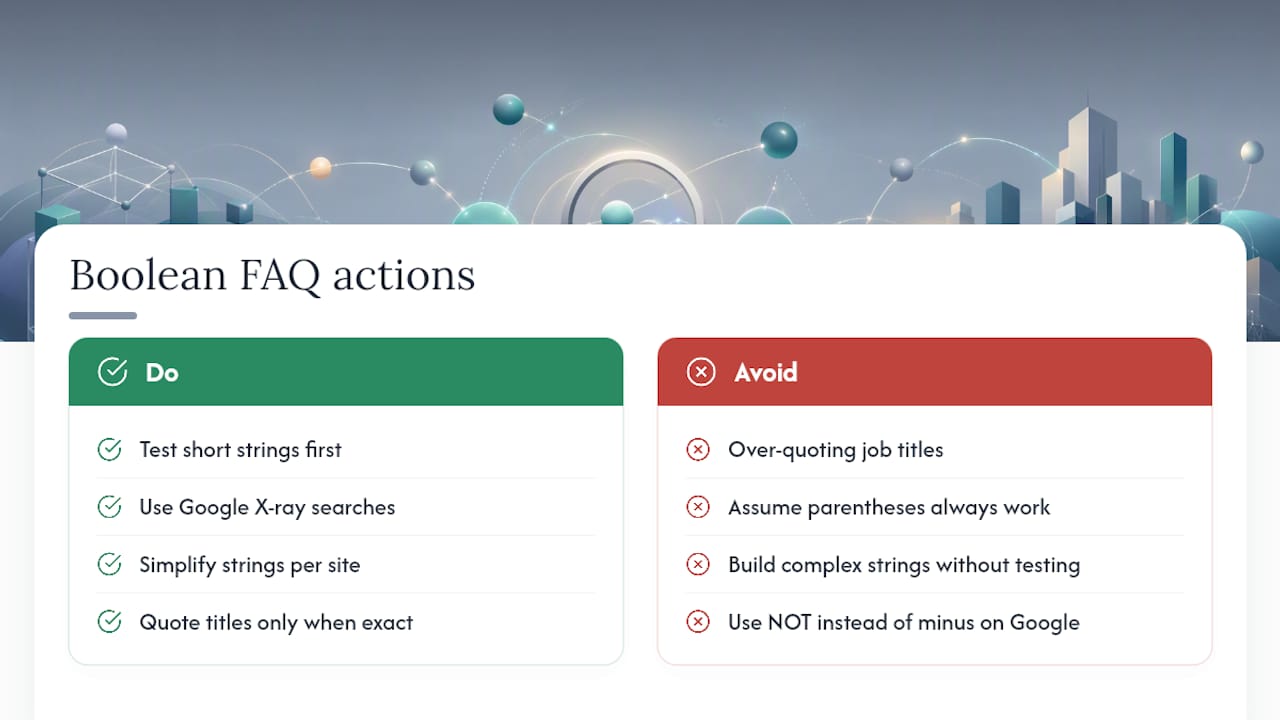
- Job boards and applicant tracking systems (ATS): most accept basic AND/OR/NOT logic, though some drop support for parentheses. Test a short string first, then build up.
- Google X-ray search: add
site:linkedin.com/jobsorsite:greenhouse.iobefore your keywords. Google treats space-separated terms as AND by default, uses a minus sign instead of NOT for exclusions, and won’t honor asterisk truncation. - Company career sites: x-ray a specific domain with
site:company.com/careerswhen you want to check openings before they hit aggregator sites.
Pro Tip: An X-ray search on a company’s careers page can surface a listing days before it shows up on a job board, based on how Google’s site search syntax indexes fresh content.
How to Build an Effective Job Search String
Building a strong Boolean string is a repeatable process, not guesswork. Follow these four steps in order.
- List your must-have terms. Write down the job title, seniority level, and any flags that matter, like remote, contract, or hybrid.
- Gather synonyms and spelling variants. A “customer success manager” role might also be listed as “client success lead” or “account manager, customer.” Include UK and US spelling differences too, like “organization” versus “organisation.”"
- Group and combine. Wrap synonyms in parentheses with OR between them, then use AND to connect that group to your other required terms. Add quotes around any exact phrase that must appear intact.
- Exclude what you don’t want. Add NOT or a minus sign for terms that keep pulling in irrelevant results, like “senior” if you’re job hunting at entry level.
Once you’ve built the string, test it and watch the result count:
- Too few results (under 5) usually means your quotes are too restrictive or your synonym list is too short.
- Too many irrelevant results means you need another exclusion or a more specific phrase in quotes.
- Open a handful of actual listings, not just the count, to check whether your string is catching the right roles or just the right words. Iterating this way is standard practice in database search and works just as well on job boards.
Ready-to-Copy Boolean Search Templates
Adjust the bracketed terms and paste these directly into a job board’s keyword field or a Google X-ray search.
- Entry-level:
("junior developer" OR "graduate developer" OR "entry level engineer") AND (Python OR JavaScript) - Mid-level:
("marketing manager" OR "brand manager") AND ("5 years" OR "3+ years") AND remote - Senior:
("director of operations" OR "VP operations" OR "head of operations") AND NOT junior - Remote-only:
(remote OR "work from home" OR "fully remote") AND ("data analyst" OR "data scientist") - Contract work:
(freelance OR contract OR "fixed term") AND ("UX designer" OR "product designer") - Exclude a sector:
("project manager") AND NOT (construction OR healthcare) - Customizable base template:
("your title" OR "alt title 1" OR "alt title 2") AND (skill1 OR skill2) AND (remote OR hybrid) NOT unwanted-term
A Boolean search generator can produce platform-specific versions of these same templates for LinkedIn, Indeed, and Google X-ray if you’d rather not build every string from scratch.
Why Is My Boolean Search Returning No Results?
Most zero-result searches trace back to one of four mistakes.
- Too narrow: you’ve stacked too many required terms with AND. Loosen it by converting one required term into an OR group instead.
- Quote misuse: wrapping a whole job title in quotes when employers phrase it differently kills matches that would otherwise work. Quote only the exact phrase you truly need intact.
- Spelling mismatches: searching only “organization” misses UK listings that spell it “organisation,” and searching only “resume” misses postings that say “CV.”
- Wrong input field: pasting a Boolean string into LinkedIn’s general search bar instead of the Jobs keyword field, which is the single most common error jobseekers make on that platform.
Pro Tip: If a string suddenly returns zero results after working fine, remove your most recent addition first. It’s almost always the newest exclusion or phrase that’s too aggressive.
How Jobtide Turns Boolean Logic Into Automatic Filters
Building these strings by hand works, but it takes time you could spend applying. Jobtide is an innovative platform that connects candidates with matching opportunities using the same logic you just learned, translated into filters you set once. Instead of typing (remote OR hybrid) AND ("product manager" OR PM) into five different job boards, you set those as filters on Jobtide and let matching recommendations come to you.
Skills, job titles, contract type, and remote preference all map to the same AND/OR groups you’d write manually, minus the retyping every time you search.
A Quick Note From Alisher
I’ve built enough of these strings to know the payoff is real. My one tip: start broad with OR groups, then narrow with AND only after you see what’s actually out there. Overbuilding your first search wastes more time than it saves.
Skip the Typing, Let the Filters Do It
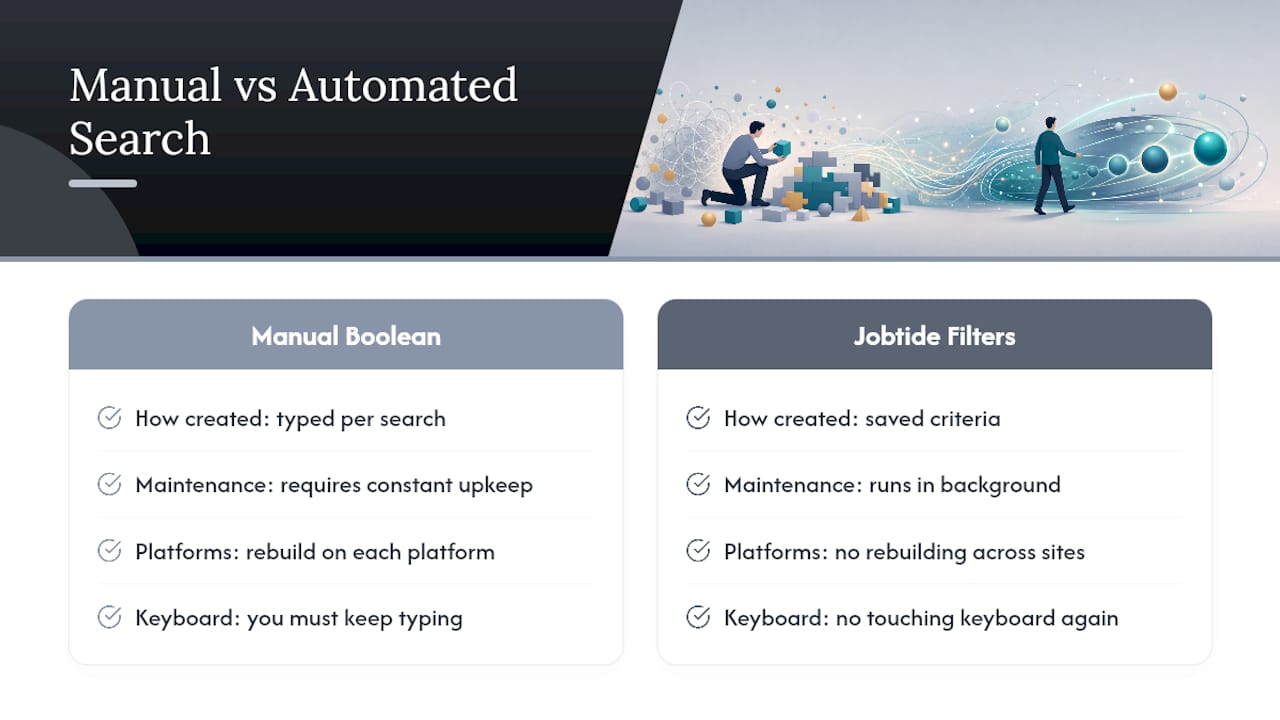
Boolean strings work, but you have to rebuild them every time you search a new platform. Jobtide takes the filtering logic you’d normally type by hand, skills, titles, remote status, contract type, and turns it into saved criteria that keep surfacing matches without you touching a keyboard again. That’s the real difference between manual search strings and an automated match: one requires constant upkeep, the other runs in the background. If you’re ready to stop rebuilding the same query on five different sites, set up your filters on Jobtide and see what it surfaces for your next role.
Frequently Asked Questions
Does Boolean search work on Indeed the same way it works on LinkedIn? Indeed supports basic AND/OR/NOT logic in its keyword field, but its parentheses handling is less consistent than LinkedIn’s Jobs field. Test a short string before building something complex.
Can I use Boolean search directly in Google to find job listings?
Yes, using an X-ray search like site:greenhouse.io "product manager" works well. Remember Google treats spaces as AND automatically and uses a minus sign, not, for exclusions.
Why does my Boolean string work on one job board but not another? Platforms vary in how much Boolean syntax they support. Some drop parentheses handling or truncation, so a string built for one site may need simplifying for another.
Should I always put my job title in quotes? Only when the exact phrasing matters and you’re confident employers use that precise wording. Over-quoting is one of the most common reasons searches return too few results.
Sources
For deeper operator explanations, see MIT’s Boolean search guide and the NYPL’s Boolean primer. To build copy-ready strings faster, try the Boolean search generator.
Help shape JobTide.
Tell us about your job search in our early-access questionnaire. JobTide is in development; completing it does not generate a resume.
Start my questionnaire →