Job Search Automation: A Safer Way to Apply for Jobs

Help shape a future CV tailoring tool. Start the JobTide early-access questionnaire →
Job search automation means using software to find, match, and apply to jobs on your behalf, combining job discovery, candidate matching, and auto-apply into one workflow. The verdict: supervised automation works. Unfettered mass-apply tools don’t. Zapier’s roundup of AI job search tools confirms the best results come from pairing discovery filters with human review, not blind auto-submission. Job Tide builds that supervision into the platform itself.
Here’s what actually matters before you turn on any automation:
- Automation saves time on discovery and form filling, not on judgment.
- Mass-apply without review tends to produce low-quality matches and can flag your applications as spam.
- Platforms with approval gates and volume caps outperform pure “fire and forget” tools.
Quick take: treat automation as a force multiplier for a targeted search, not a replacement for deciding which jobs deserve your name on them.
Key Takeaways
Supervised automation, paired with tight filters and human review, consistently outperforms unfiltered mass-apply tools on interview rate.
| Point | Details |
|---|---|
| Automate discovery, not judgment | Let software find and match listings, but keep a human approval gate before each send. |
| Cap your daily volume | Ten to fifteen applications a day keeps quality high and avoids spam flags. |
| Track interview rate, not send count | Reply rate and time-to-interview reveal more than raw application totals. |
| Protect your credentials | Use OAuth login and a password manager instead of sharing passwords with automation tools. |
| Job Tide adds supervision by design | Its filtering and personalized matching keep you in control of what gets submitted. |
Table of Contents
- How Does Job Search Automation Actually Work?
- How Do You Set Up Job Search Automation Safely?
- How Do You Keep Automated Applications From Looking Generic?
- What Are the Risks of Automating Job Applications?
- What Metrics Should You Track to Know If Automation Is Working?
- Why Job Tide Supports Safer Automation
- A Short Note on Using Automation Responsibly
- Try Supervised Automation With Job Tide
- Sources
How Does Job Search Automation Actually Work?
Automation platforms pull job listings two ways: scraping public job boards or connecting through employer and aggregator APIs. API access tends to produce cleaner, more current data, while scraping casts a wider net but risks duplicate or stale postings. Either way, the software needs a steady feed before it can do anything useful.
Matching algorithms then score each listing against your profile using a few consistent signals:
- Keyword overlap between your resume and the job description’s required skills.
- Experience level matching, so a five-year analyst isn’t pushed toward entry-level postings.
- Skill taxonomy matching, which groups related terms (like “SQL” and “database querying”) so exact phrasing doesn’t block a good fit.
Once a match clears your threshold, auto-apply tools take over: they tailor your CV summary, fill application forms automatically, schedule submissions across the day, and sometimes integrate directly with applicant portals. Zapier’s GitHub repository shows how these systems are typically built from smaller connectors and APIs stitched together, not one single engine doing everything.
Human review belongs at two checkpoints: before a tailored application goes out, and at a preset quota (say, ten applications a day) that forces you to glance at what’s being submitted in your name.
How Do You Set Up Job Search Automation Safely?
Start narrow, then widen once you trust the output.
- Define target roles and quality thresholds. List exact job titles, seniority range, and a short exclusion list (industries, companies, or locations you won’t consider).
- Prepare a canonical resume plus three or four short, role-specific snippets you can swap in for different job families.
- Set volume caps. Ten to fifteen applications a day is a reasonable starting ceiling for most job seekers; anything higher usually means quality slips.
- Configure approval gates so every tailored application needs a one-click confirmation before it submits.
- Run a two-week pilot. Log every send, every reply, and every rejection reason you can identify.
- Refine your filters based on what the pilot shows. Tighten keyword matching if you’re getting irrelevant listings; loosen it if the pool is too thin.
Pro Tip: Run your pilot against one job family at a time. Mixing three very different roles in the same automation batch makes it nearly impossible to tell whether a low reply rate is a resume problem or a targeting problem.
This staged approach mirrors what product listings for tools like JobCopilot describe as the difference between early adopters who see fast results and those who report frustration: the fast group configures tightly before scaling volume.
How Do You Keep Automated Applications From Looking Generic?
Keyword targeting works best when it’s aimed at the job’s stated requirements, not stuffed with every term from the full posting. Match the three or four skills the listing actually asks for. Padding a resume with unrelated keywords to “beat the ATS” usually backfires. Applicant tracking systems increasingly weigh relevance over raw keyword density.

Cover letters benefit from the same restraint. Build two or three short, configurable templates with placeholders for company name, role title, and one specific detail pulled from the posting. That’s enough to avoid the “Dear Hiring Manager at [COMPANY]” mistake that instantly signals a copy-paste job.
A few habits keep quality high:
- Run an automated check that flags any application where the company name or job title doesn’t match the template variables.
- Spot-check every tenth application manually, even after your pilot period ends.
- Watch for postings with vague titles or missing salary information. These often generate poor matches and deserve a manual look instead of an automatic send.
Pro Tip: If a role sits outside your usual target list but genuinely excites you, apply manually. Automation is for volume within your lane, not for the one job that’s worth writing a real letter.
What Are the Risks of Automating Job Applications?
Automation introduces real exposure if you’re careless with access and pace. A few common risks, and the fixes that actually address them:
- Credential exposure: connecting automation tools to your email or job board account. Use OAuth login where offered instead of sharing your password directly, and keep a password manager for anything that requires manual credentials.
- Spam perception: applying to dozens of loosely matched roles reads as noise to recruiters and can get your account flagged on some platforms. Volume caps and tight filters prevent this.
- ATS rejection: formatting quirks from auto-filled forms (extra spaces, broken bullet characters) can trip parsing systems before a human ever sees your application.
- Data retention: many auto-apply services store your resume and contact details indefinitely. Read the terms of service before connecting, and check what happens to your data if you cancel.
Coverage of the rapid growth in auto-apply services is a useful reminder that this market is moving fast, and not every new tool has mature privacy practices yet.
What Metrics Should You Track to Know If Automation Is Working?
Application count is the least useful number you can watch. Interview rate tells you far more.
Track these instead:
- Sends per week, so you know your actual volume.
- Reply rate, the share of applications that get any response.
- Interview rate, replies that convert to a scheduled conversation.
- Time-to-interview, how many days pass between sending and hearing back.
Run simple A/B tests: swap one resume snippet for another across similar roles, or tighten your matching filter by 10% for two weeks and compare interview rates before and after. A basic dashboard reviewed weekly is enough for most job seekers. Businesses covering the auto-apply space note that platforms emphasizing analytics over raw send volume tend to produce better outcomes for users who actually check them. If your interview rate drops for two consecutive weeks, pause automation and manually review the last twenty applications before resuming.
Why Job Tide Supports Safer Automation
Job Tide builds the supervision layer directly into the matching process instead of bolting it on afterward. The platform’s filtering tools let you set the same kind of quality thresholds this guide recommends, skills, experience level, and role type, before any recommendation reaches your queue.
- Personalized job recommendations reduce the noise of scraped listings from generic boards.
- Advanced filtering lets you set exclusion criteria upfront, the same discipline a careful pilot requires.
- Human-in-the-loop review stays central to how recommendations get surfaced, rather than defaulting to blind auto-apply.
Job Tide is still in its launch phase, and its feature set is expanding as employer and candidate feedback comes in.
A Short Note on Using Automation Responsibly
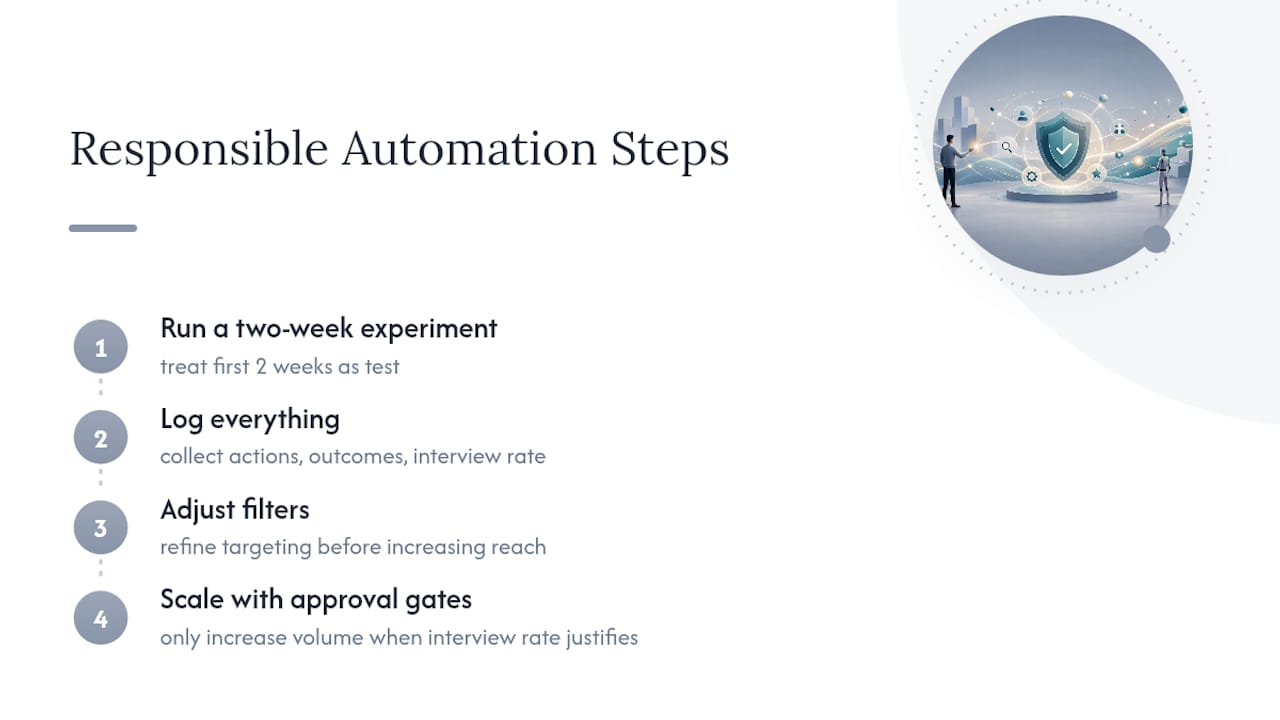
Automation is a multiplier, not a replacement for judgment. It can double your reach in the time you’d otherwise spend scrolling job boards, but it multiplies bad targeting just as fast as good targeting. The job seekers who benefit most are the ones who treat their first two weeks as an experiment: log everything, adjust filters, and only scale volume once the interview rate justifies it.
Measure before you trust the numbers. Iterate before you scale. If you want a starting point that already has approval gates and filtering built in, Job Tide is worth trying.
— Alisher
Try Supervised Automation With Job Tide
Job Tide gives you personalized job matching and filtering without handing your applications over to an unsupervised bot. Where a raw auto-apply tool fires off applications the moment a keyword matches, Job Tide surfaces recommendations built around your actual criteria, skills, experience level, and role preferences, so you stay the one deciding what goes out.
That means fewer wasted applications and less time spent undoing a bad match after the fact. The platform is designed for exactly the workflow this guide walks through: tight filters, human review, and recommendations you can trust instead of a flood you have to police. If you’re ready to run your own supervised pilot, start with Job Tide and set your first round of filters today.
Sources
Help shape JobTide.
Tell us about your job search in our early-access questionnaire. JobTide is in development; completing it does not generate a resume.
Start my questionnaire →