Phone Screen Questions: What to Ask and How to Answer

Help shape a future CV tailoring tool. Start the JobTide early-access questionnaire →
A phone screen is a short call that filters candidates before anyone spends time on a full interview. It runs on three question types: logistics (salary, availability, authorization), behavioral (how you’ve handled real situations), and technical or role-specific checks. If you’re a candidate, your one move before the next call is simple: build a one-page cheat sheet with your key numbers, three STAR stories, and questions to ask. If you’re hiring, adopt a 4-criteria scorecard so every candidate gets judged the same way.
A structured phone-screen process with a short scorecard cuts time-to-hire and improves decision quality, according to hiring guidance from Prepzo. That single habit, on either side of the call, changes outcomes more than any clever question.
- Candidates: write your cheat sheet before you read another word of this guide.
- Hiring managers: score every candidate on the same four criteria, right after you hang up, not the next day.
Key Takeaways
A phone screen rewards preparation more than talent, and the candidates and employers who use a written structure consistently outperform those who wing it.
| Point | Details |
|---|---|
| Build a one-page cheat sheet | Include three STAR bullets, key metrics, and three questions to ask before every call. |
| Time your answers | Aim for 45 to 60 seconds on openers and 60 to 90 seconds on STAR behavioral answers. |
| Use a 4-criteria scorecard | Hiring managers should rate qualifications, motivation, communication, and logistics 1 to 3 each. |
| Watch for dropout questions | Salary mismatch, authorization issues, and notice period conflicts end candidacies most often. |
| Decide fast | Score and decide within 24 hours to avoid losing strong candidates to other offers. |
| Organize your search | Jobtide helps candidates track applications, filter roles, and keep prep notes tied to each opportunity. |
Table of Contents
- Phone Screen Questions You Should Expect (and Ask)
- How to Answer Phone Screen Questions With Confidence
- Smart Questions to Ask at the End of the Call
- Your Phone Screen Preparation Checklist
- A Simple Scoring Rubric for Hiring Managers
- Customizing Phone Screen Questions by Job Level
- What Employers Legally Cannot Ask on a Phone Screen
- Handling a Question You Didn’t Prepare For
- What Happens After You Hang Up the Phone
- Making a Virtual or Video Phone Screen Go Smoothly
- The One Habit That Separates Prepared Candidates From Everyone Else
- Let Jobtide Handle the Busywork Around Every Phone Screen
- Sources
Phone Screen Questions You Should Expect (and Ask)
Recruiter-led calls and hiring-manager calls test different things. Recruiter screens focus on salary, availability, and work authorization, while hiring-manager calls dig into how you actually work. Knowing which type you’re on changes how you should answer.
Recruiter and logistics questions
- What are your salary expectations for this role?
- When could you start if offered the position?
- Are you authorized to work in this country without sponsorship?
- What’s your notice period at your current job?
- Are you comfortable with the location or remote arrangement listed?
These sound routine, but they’re the questions that end candidacies most often.
Hiring-manager and behavioral questions
- Tell me about a time you handled a tight deadline or a sudden setback.
- Describe a project you led and what you’d do differently.
- Walk me through how you handled a disagreement with a manager or teammate.
- What’s a mistake you made recently and how did you fix it?
Technical and role-specific questions
- Walk me through your experience with [specific tool or process tied to the job].
- How would you approach [a real problem from the role]?
- What metrics did you own in your last position, and how did you move them?
Closing questions from the interviewer
- Do you have any questions for me?
- What other roles are you currently interviewing for?
How to Answer Phone Screen Questions With Confidence
Timing matters more on the phone than in person, because there’s no body language to soften a long pause or a rambling answer. Aim for 45 to 60 seconds for opening questions and 60 to 90 seconds for STAR-style behavioral answers. Anything longer and you lose the interviewer; anything shorter and you sound unprepared.
Since the interviewer can’t see you nod or lean in, verbal signposting does that work instead. Phrases like “the situation was” and “what I did next was” replace the visual cues you’d normally give in person, and a short, deliberate pause before answering reads as thoughtful rather than awkward.
Three answers worth rehearsing out loud:
- “Tell me about yourself”: 90 seconds, structured as present (what you do now), past (how you got here), future (why this role). Skip your life story; stick to what’s relevant to the job.
- “What are your salary expectations?”: Give a researched range, not a single number, and tie it to the market rate for the role and your experience level.
- “Tell me about a time you handled a setback”: Use STAR (Situation, Task, Action, Result), and end on the result with a number if you have one. “We cut the delay from three weeks to four days” lands harder than “it went well.”
Pro Tip: Practice your 90-second opener out loud, on your phone, before the call. Reading it in your head always sounds shorter than it is.
Smart Questions to Ask at the End of the Call
The questions you ask reveal as much as the ones you answer. A candidate who asks only “when will I hear back?” signals passive interest; one who asks about team priorities signals someone already thinking about the job.
For a recruiter, ask about process: “What does the timeline look like from here?” or “How many candidates are you moving to the next round?” These tell you where you stand and how competitive the pool is.
For a hiring manager, ask about substance: “What would success look like in the first 90 days?” or “What’s the biggest challenge facing the team right now?” Those answers tell you what the job actually demands, beyond the posting, and they position you as someone already picturing the work.
- What does the timeline look like from here?
- How many candidates are advancing to the next round?
- What would success look like in the first 90 days?
- What’s the biggest challenge the team is facing right now?
- How is this role structured within the wider team?
- What’s the next step after this call?
Your Phone Screen Preparation Checklist
Most phone screen failures aren’t about knowledge. They’re about a dog barking, a dead phone battery, or a candidate who freezes because they didn’t write anything down beforehand. Government careers guidance recommends checking your phone, picking a quiet spot, and preparing short answers well before the call starts.
- Charge your phone fully and pick a quiet room with strong signal; have a backup number ready in case the call drops.
- Build a one-page cheat sheet: three STAR bullets, two or three key metrics from your work, and three questions to ask.
- Keep a glass of water nearby and stand up if it helps you sound more energetic.
You’re allowed to use written notes on a phone screen, which is one advantage over an in-person interview. Use it.
Pro Tip: If you need a second to think, say “That’s a good question, give me a moment” instead of filling the silence with filler words. A two-second pause sounds composed; “um, so, like” sounds rattled.
A Simple Scoring Rubric for Hiring Managers
Score every candidate on the same four criteria, right after the call: qualifications fit, motivation, communication or phone presence, and logistics fit. Rate each 1 to 3, and total the score before moving to the next call. This keeps decisions consistent and cuts the bias that creeps in when you’re comparing memory of one call against another.
Pass on a candidate when you see a real salary mismatch, evasive answers to direct questions, or communication so unclear it would frustrate a team five times a day. Deciding within 24 hours keeps your top candidates from accepting somewhere else while you deliberate.
- Qualifications fit: does their experience match the role’s real requirements?
- Motivation: can they explain specifically why this job, not just any job?
- Communication: clear, concise, and easy to follow on audio alone?
- Logistics: salary, start date, and location all workable?
Customizing Phone Screen Questions by Job Level
A phone screen for an entry-level coordinator and one for a director should not run the same script. Junior roles reward questions about learning speed and coachability, since there’s little track record to probe. Ask about a time they had to learn something fast, or how they handle feedback they disagreed with.
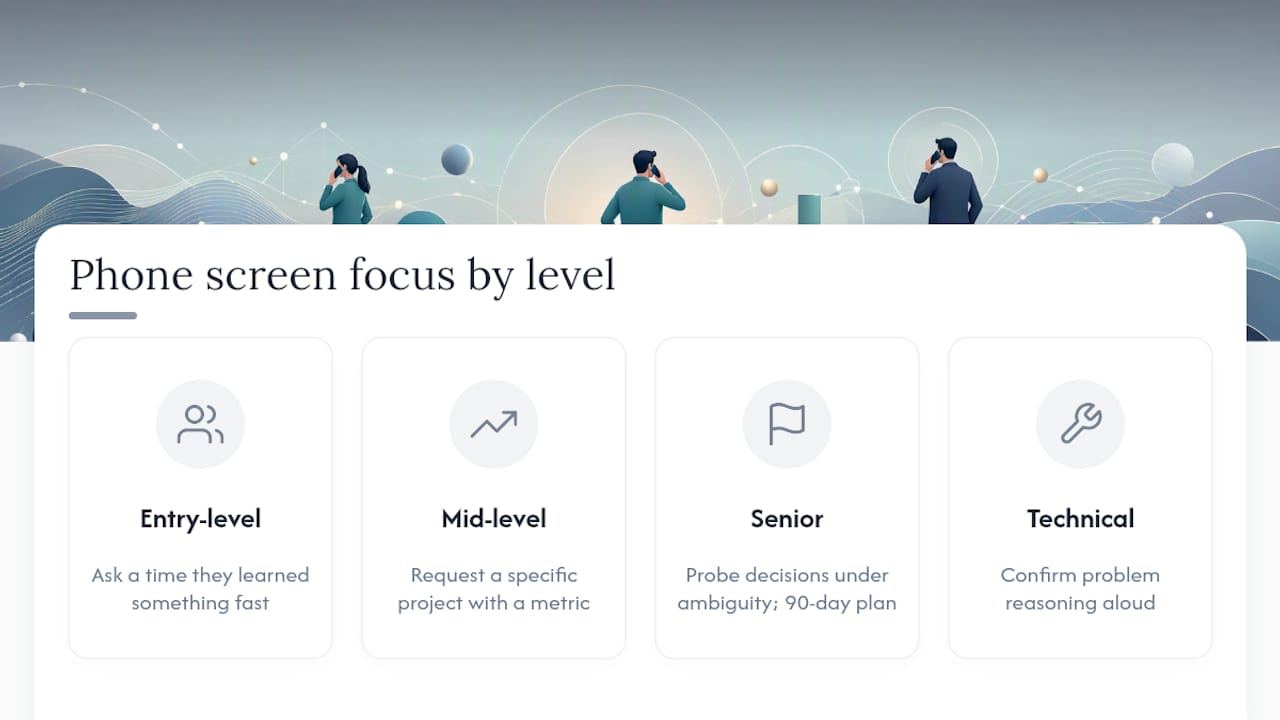
Mid-level roles shift toward ownership: what did this person actually run, and what happened because of it? Ask for a specific project with a measurable outcome, and push past vague answers like “I helped improve the process” to get the actual number.
Senior and leadership roles need a different lens entirely. Skip the basic behavioral prompts and ask about decisions made under ambiguity, how they’ve influenced people outside their direct reports, and how they’d approach the team’s current biggest problem in the first 90 days. A director candidate who can’t speak to strategy on a 20-minute call is unlikely to develop that skill on the job.
Technical roles deserve a scaled-down technical check even at the phone stage. Phone-based technical rounds often run audio-only or through a shared editor and tend to focus on how a candidate reasons through a problem rather than perfect syntax. Save deep whiteboarding for the in-person or video round; use the phone screen to confirm the candidate can talk through their thinking clearly.
What Employers Legally Cannot Ask on a Phone Screen
Some questions that feel like small talk carry real legal risk. Avoid asking directly about a candidate’s age, marital status, pregnancy or family plans, religion, disability, or national origin. Even a friendly “Do you have kids?” meant to build rapport can expose an employer to a discrimination claim if that candidate is later rejected.
The safer approach is to ask about the job’s actual requirements instead of the personal status behind them. Instead of “How old are you?” ask “Are you legally able to work in the roles required for this position?” Instead of asking about health conditions, ask “Can you perform the essential functions of this job, with or without reasonable accommodation?”
Salary history questions carry their own risk in some jurisdictions, where asking a candidate what they currently earn is restricted or banned outright to prevent pay gaps from following someone between jobs. Ask about salary expectations instead of salary history; it gets you the same planning information without the legal exposure.
For hiring managers, the practical fix is a written list of approved phone screen questions that every recruiter uses, rather than leaving each call to improvisation. Consistency protects the candidate and the company both, since a documented, standard question set is much harder to challenge as discriminatory than an ad hoc conversation.
Handling a Question You Didn’t Prepare For
Every candidate eventually hits a question that isn’t on any list they rehearsed. The instinct is to fill the silence immediately, and that’s usually the wrong move. A brief pause, even two or three seconds, reads as thoughtful on a recorded or live call; a rushed, half-formed answer reads as unprepared.

If the question is genuinely unclear, ask for clarification rather than guessing at what they mean. “Just to make sure I answer what you’re looking for, are you asking about the outcome or the process I used?” buys you time and often reveals exactly what the interviewer wants to hear.
For a question about a weakness or a failure, resist the urge to disguise a strength as a flaw. “I work too hard” convinces no one. Pick something real, explain what you changed because of it, and stop there; a specific, honest answer with a fix attached lands better than a rehearsed dodge.
If you truly don’t know the answer, especially on a technical question, say so directly and explain how you’d find out. “I haven’t worked with that specific tool, but here’s how I’d approach learning it” shows honesty and problem-solving in the same breath, which often scores better than a guess that falls apart under a follow-up question.
What Happens After You Hang Up the Phone
For candidates, send a short thank-you note within 24 hours, ideally by email, referencing one specific thing discussed on the call. A generic “thanks for your time” gets forgotten; a note that says “I appreciated hearing about the team’s push into the new market” shows you were actually listening.
If you haven’t heard back by the timeline the recruiter gave you, one polite follow-up is reasonable. Beyond that, chasing repeatedly signals anxiety rather than interest, so give it space and keep applying elsewhere in the meantime.
For hiring managers, the follow-up matters just as much. Fill out the scorecard immediately, while the call is fresh, rather than batching notes at the end of the day when details blur together. Communicate next steps to the candidate quickly, even if the news is a pass, since candidates remember how they were treated, and that reputation follows a company into future hiring cycles.
Making a Virtual or Video Phone Screen Go Smoothly
Some phone screens now happen over video instead of a straight phone call, and that shift adds a few extra variables worth managing. Test your camera and microphone at least ten minutes before the call, not the moment it starts, and close any browser tabs or apps that might trigger a notification sound mid-sentence.
Lighting matters more than most candidates expect. Face a window or a lamp rather than sitting with a bright light behind you, since a backlit silhouette makes it hard for the interviewer to read your expressions, and expressions do a lot of work in a video call that a phone call doesn’t need.
Etiquette shifts slightly too. Look at the camera, not the screen, when you’re speaking, since eye contact on video means looking at the lens rather than at the intervier’s face on your monitor. Keep notes visible but glance at them briefly rather than reading verbatim, since a candidate whose eyes are clearly scanning a script off to the side loses some of the credibility a phone call would have hidden entirely.
Have a backup plan ready regardless of format. If the video platform fails, agree in advance whether you’ll switch to an audio call or reschedule, so a technical glitch doesn’t turn into a wasted slot for either side.
The One Habit That Separates Prepared Candidates From Everyone Else
The candidates who consistently move forward aren’t the most impressive on paper. They’re the ones who clearly rehearsed their answers out loud instead of just thinking them through silently. A one-page cheat sheet turns a nervous, rambling call into a controlled one, simply because the candidate isn’t searching for numbers and stories mid-sentence.
If there’s one habit worth building before your next call, it’s this: read your 90-second opener out loud, twice, before you pick up the phone.
— Alisher
Let Jobtide Handle the Busywork Around Every Phone Screen
Preparing for a phone screen gets harder when you’re juggling six job boards, three spreadsheets, and a dozen half-finished applications. Jobtide gives you one place to track roles you’ve applied to, filter listings down to the ones actually worth your time, and keep your prep notes attached to each application instead of scattered across sticky notes and email drafts.
The platform’s personalized job recommendations mean you spend less time scrolling irrelevant postings and more time rehearsing the answers that actually matter for the roles you want. Whether you’re a recent graduate building your first cheat sheet or a career switcher managing multiple active applications at once, having your pipeline organized in one place makes every phone screen easier to walk into prepared. Visit Jobtide to set up your profile and start organizing your job search before your next call comes in.
Sources
Help shape JobTide.
Tell us about your job search in our early-access questionnaire. JobTide is in development; completing it does not generate a resume.
Start my questionnaire →